Guides › Settings
Connect your Plex server
About 3 minutes
Link your media server once and six cards appear: browse and play films, see who is watching, watch the server's health.
What this is
If you keep your own films and music on a Plex server, Theatrium can read it. That gives you the Plex Player, Plex Server, Plex Now Streaming, Library Stats, Plex Activity and Plex Top Charts cards, and the Movie Posters screensaver. Plex can also be a music source for the Now Playing card.
The server is separate from your smart home; you can link one with Home Assistant, Apple Home or no smart home at all.
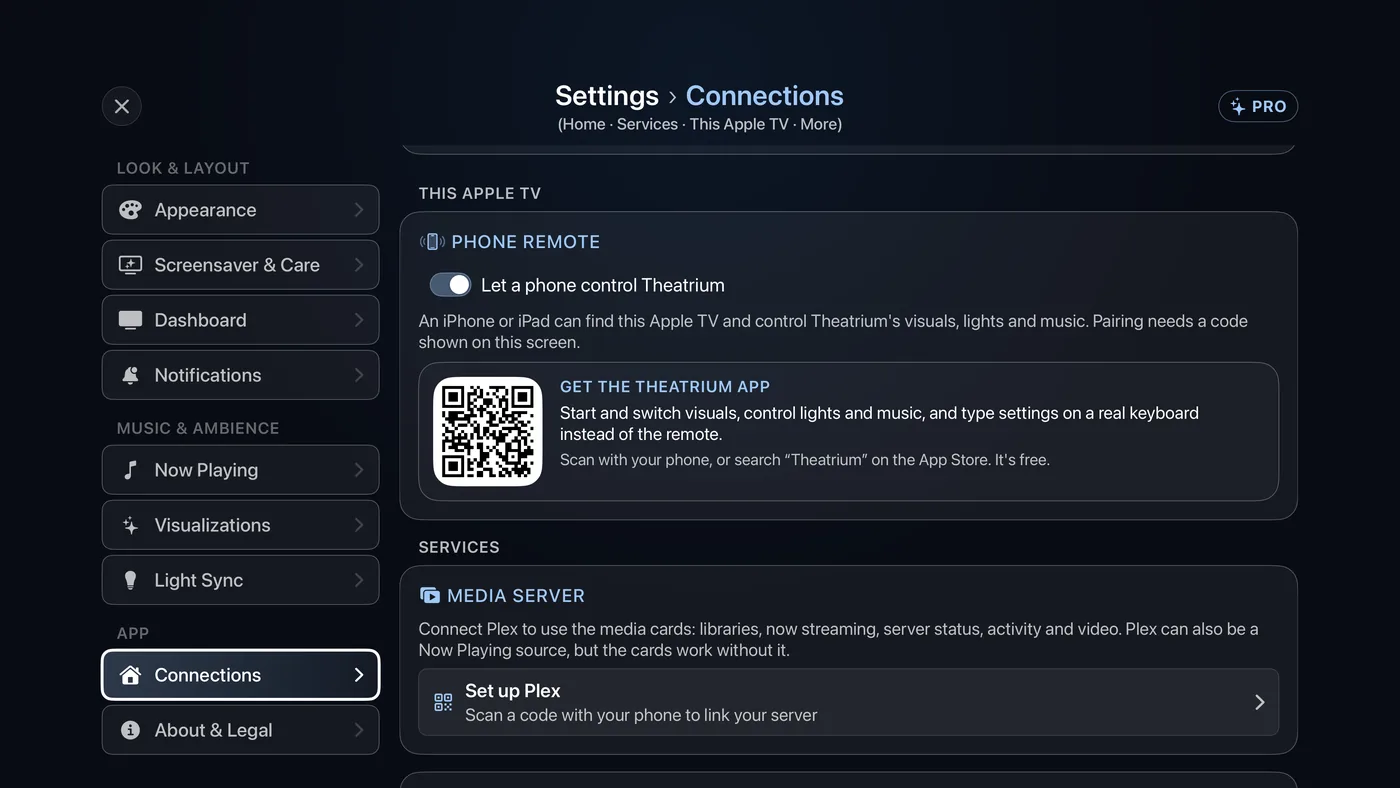
Linking Plex
- Open Settings › Connections and move down to the Media Server card. Select the row that reads Set up Plex. (The same row appears under Settings › Now Playing when Plex is your source; both open the same screen.)
- On the Your Plex server screen, choose Sign in with Plex. A code appears on the TV, with a square code to scan.
- On your phone or computer, scan the square code or go to plex.tv/link, sign in if asked, and enter the code. Approving from the phone saves typing a password with the remote.
- The TV says Signed in – finding your server…, then Connected to and your server's name. Done.
Good to know
- The six Plex cards appear in the card chooser only once a server is linked. A TV that has never heard of Plex is not offered six empty cards.
- More Plex settings, at the foot of the Plex screen, holds the server address and token. They are only for a remote or unusual server; signing in fills them for you.
- Once linked, the same screen offers Reconnect and Disconnect. A green dot beside your server's name means it has been answering; amber means it has not.