Guides › Phone app
The Theatrium app for iPhone and iPad
A free companion app that finds your Apple TV and lets you switch visuals, control lights and music, start timers, add countdowns, browse what's playing, and type settings on a real keyboard.
What it does
The phone app is a remote for Theatrium, in five tabs: Remote, Visuals, Lights, Short Stay (once it is turned on) and Settings. From the sofa or the kitchen you can start and switch visuals, turn the room lights and light sync on and off, control the music, switch the dashboard between Main Screen and More Cards, and open the film or show that is playing to see its poster, cast and episode list. This guide is for version 1.4 of the app with Theatrium 1.9 on Apple TV; a few features need the newer TV app and say so on the phone. Best of all, Settings › Home Connection is where you type your Home Assistant address and token, and Settings › Accounts & Feeds is where you type your Last.fm username, your calendar links, your camera and stream links and your dashboard title, on a proper keyboard instead of the TV remote.
The Settings tab also reaches further than the remote controls:
- Reminders for the To-Do card. tvOS cannot read Apple Reminders on its own; the phone app can. Turn it on under Settings › To-Do List, choose a list, and it sends that list to the dashboard's To-Do card over the same paired connection. See To-Do List.
- Countdowns. Under Settings › Countdowns, add your own events, repeating every year or on the Hebrew, Islamic or Chinese calendar, or choose Add a Birthday from Contacts. Theatrium sends only that person's name and birthday, and only to your own Apple TV. Common holidays are already on the TV. See Countdown.
- Timers. Under Settings › Timers, start a timer on your Apple TV, then pause it, add a minute or cancel it from the phone. With Ring on this iPhone on, the iPhone sounds when a timer ends. See Timers.
- Halloween Mode. One switch in Settings turns on the TV's Halloween look: the backgrounds, the colors and the three Halloween music visuals together. It sits near the top of Settings in September and October. It needs Theatrium 1.9 on the TV. See Halloween.
- Theme and background pictures. Settings shows each theme as a picture of its dashboard, with that theme's backgrounds underneath. Tap one and your TV changes as you tap; Pro ones are marked. With an older TV app you keep a plain theme list.
- Cameras & Streams. In Accounts & Feeds, add, order and remove the camera and stream links (up to twelve) for the Cameras & Streams card, and watch them appear on the TV.
- Spotify. Choose Spotify under Now Playing Source and the app shows the numbered steps, with an Open Spotify button, until the TV reports it is connected to your account. After that the Remote tab shows the track and artwork, with play, pause, skip and volume. Spotify needs Premium.
- Adding cards with Siri. Say “Hey Siri, customize my Theatrium” to the phone and add a card to the dashboard by voice, without touching the remote. See Set up your Theatrium dashboard with Siri.
For Short Stay hosts it is where you type the guest's name, fill in the house guide, and choose the guest screen's background photos - all quicker on a phone keyboard than the Siri Remote. See Short Stay: a welcome screen for guests.
Theatrium Pro can also be unlocked from the phone app, under Settings › Theatrium Pro. After you have used the app on a few different days, finishing a task may bring a polite request to rate it on the App Store. It asks rarely.
Pairing the phone with the TV
The first time the app opens, a short guide welcomes you, explains the one iOS question about finding devices on your network before it asks it, finds your Apple TV and pairs with the code shown on the screen. If Theatrium is not on your Apple TV yet, Set up Theatrium on my Apple TV shows what you are about to get beside four install steps, and carries on to pairing as soon as Theatrium appears on your network. Explore without a TV opens a demo. Run the guide again any time with Settings › Your Apple TV › Set up again…; it does not forget your TV. Pairing by hand works like this:
- On the TV, open Settings › Connections and move down to Phone Remote. Turn on Let a phone control Theatrium.
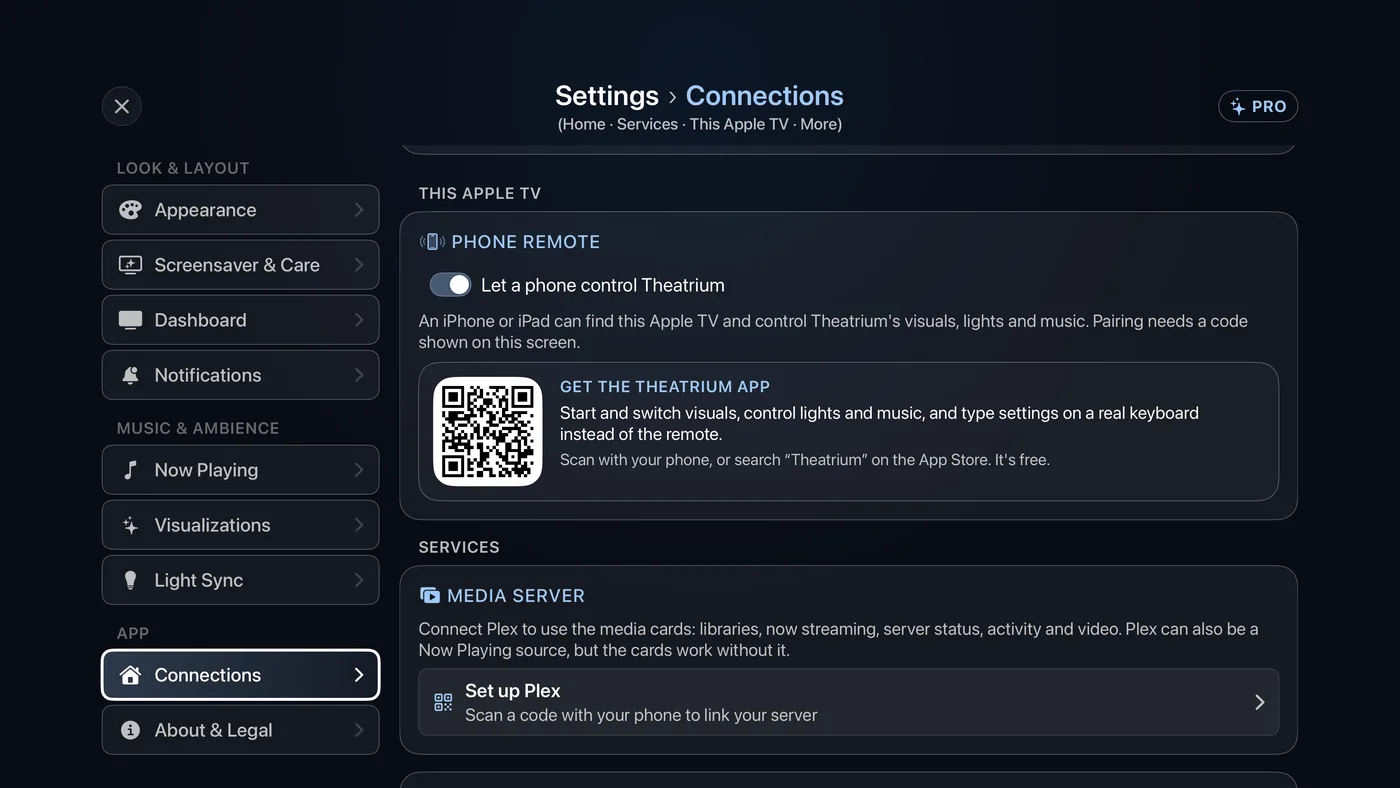
Settings › Connections › Phone Remote. - Open the Theatrium app on your iPhone or iPad, on the same Wi-Fi as the Apple TV. It finds the TV and asks for a code.
- Read the code shown on the TV screen and type it into the phone. The phone appears in the TV's list of paired phones, under Settings › Connections › More connection settings › Paired Phones.
To unpair a phone later, choose Forget This Apple TV under Your Apple TV in Settings on the phone, or Remove beside it in the TV's Paired Phones list.
Good to know
- Pairing normally finds the TV on its own; the phone and the TV must be on the same Wi-Fi. If your network keeps them from finding each other, choose Enter address (or Enter address manually) and type the TV's address instead.
- One TV can be paired with several phones; each is listed with its name. One phone can be paired with more than one TV too, and switches between them from Settings.
- Long addresses (a calendar's
.icslink, a stream address) can also arrive on the TV another way: when a text box is highlighted on the TV, tvOS offers to let a nearby iPhone type it. Accept, and whatever you type on the phone lands in the box. - Reminders keep syncing in the background while the app is closed, as long as Background App Refresh is on for Theatrium in the iPhone's own Settings.